Two decades of documentation, one afternoon.
Most companies documented their IT infrastructure long ago, only in texts, spreadsheets and ageing network plans. You hand those documents to your AI together with our prompt, and back comes a file that InfraMap takes over after a preview.
You upload what you already have, such as an old Visio plan, an inventory list or loose notes.
The AI recognises objects and connections and shows beforehand what is new and what changes.
Once you approve, the diagram is there, and every object can be monitored and extended right away.
- Your documentsTexts, PDFs, spreadsheets, wiki pages, old network plans
- Your AI, our promptClaude, ChatGPT or a model of your own
- InfraDocAn open JSON file with objects, fields and connections
- InfraMapCheck the preview, import, let it lay itself out
Strict enough that something usable comes out.
The prompt knows every object type and every field InfraMap knows. It demands pure JSON without commentary and forbids invented values, so that a helpful AI does not turn into a creative supplier of inventory.
- Copy the promptHere on this page or inside the application under Import.
- Attach your documentsDescriptions, inventory lists, the old network plan, whatever exists.
- Save the answerAs a file ending in infradoc.json.
- Import it into InfraMapThe preview shows beforehand what would be written, line by line.
Import is available from the Team plan, export in every plan.
=== BEGIN PROMPT ===

You convert a description of an IT infrastructure into a single JSON document in
the "InfraDoc v1" format. Output nothing but the JSON: no prose, no explanation,
no markdown fences.

## Output contract

The document is one JSON object:

{
  "format": "inframap.infradoc",
  "version": 1,
  "diagram":  { "name": "<short name of the whole picture>" },
  "tags":     [ ... ],        // optional
  "objects":  [ ... ],        // required in practice
  "edges":    [ ... ]         // optional
}

"format" and "version" are literal and must appear exactly as shown.

## References

Objects are addressed by "ref". A ref id matches ^[a-zA-Z0-9_-]{1,64}$ — use
short kebab-case names derived from the object ("web-01", "fw-hq", "db-crm").
Every id must be unique in the document.

Wherever one entry points at another, the value is the id prefixed with "ref:":
  "source": "ref:web-01",  "target": "ref:db-crm",  "group": "ref:dmz"

## Objects

{
  "ref": "web-01",                       // required, unique
  "type": "server",                      // required, from the type list below
  "name": "web-01",                      // required, 1..200 chars, what the user reads
  "position": { "x": 320, "y": 180 },    // optional but recommended, see Layout
  "attributes": { "ip": "10.0.1.10" },   // optional, keys from the type's field list
  "tags": ["production"],                // optional, must exist in "tags"
  "folderPath": "hq.network",            // optional, lowercase a-z0-9_ separated by dots
  "monitoring": { ... },                 // optional, see Monitoring
  "group": "ref:dmz"                     // optional, membership in a group object
}

Allowed "type" values and the attribute keys each one understands:

| type          | attribute keys                                                                                     |
|---------------|----------------------------------------------------------------------------------------------------|
| server        | ip, hostname, manufacturer, model, os, cpu_cores, ram_gb, purchase_date, location, notes, warranty_end, eol, eos |
| app           | url, version, vendor, owner, environment (production|staging|development), notes, license_end        |
| firewall      | ip, manufacturer, model, firmware, admin_url, notes, warranty_end, eol, eos                          |
| router        | ip, wan_ip, manufacturer, model, firmware, notes, warranty_end, eol, eos                             |
| hosting       | provider, domain, panel_url, contract_end, notes                                                     |
| workstation   | ip, user, manufacturer, model, os, serial, purchase_date, notes, warranty_end, eol, eos              |
| database      | engine (postgresql|mysql|mssql|oracle|mongodb|redis|other), host, port, version, notes               |
| cloud         | provider, region, account_id, console_url, notes                                                     |
| switch        | ip, manufacturer, model, ports, firmware, notes, warranty_end, eol, eos                              |
| storage       | ip, manufacturer, model, capacity_tb, raid, notes, warranty_end, eol, eos                            |
| person        | role, email, phone, notes                                                                            |
| service       | url, provider, account, notes, license_end                                                           |
| group         | owner, environment, notes  — see Groups                                                              |

Rules for attributes:
- Use ONLY the keys listed for that type. An unknown key is dropped on import.
- Leave a key out rather than inventing a value. Never write "unknown", "n/a" or "".
- ip / wan_ip / host: a single IPv4 or IPv6 address, no CIDR suffix, no port.
- url / admin_url / panel_url / console_url: absolute, including https://.
- hostname / domain: a hostname or domain, no scheme, no path.
- port, cpu_cores, ram_gb, ports, capacity_tb: numbers, not strings, no unit.
- purchase_date, warranty_end, eol, eos, license_end, contract_end: "YYYY-MM-DD".
- environment / engine: exactly one of the listed values, lowercase.
- Never output passwords, API keys or other credentials. Those fields exist in
  the product but are encrypted there and are not part of this format.

## Edges

{
  "source": "ref:web-01",     // required
  "target": "ref:db-crm",     // required, must differ from source
  "kind": "dataflow",         // dataflow | dependency | network
  "label": "SQL 5432",        // optional, <= 120 chars
  "animated": true,           // optional, use true for dataflow
  "attributes": { "protocol": "TCP", "port": 5432 }
}

Which kind to use:
- "dataflow"   — data actually moves: app to database, server to API, backup jobs.
                 attributes: protocol (TCP|UDP|HTTP|HTTPS|SSH|SMB|NFS|SQL|other),
                 port (number), direction (unidirectional|bidirectional),
                 encrypted (yes|no), data_classification (public|internal|confidential|personal)
- "network"    — physical or logical connectivity: switch to server, router to firewall, VPN.
                 attributes: vlan (number), bandwidth (text, e.g. "1 Gbit/s"),
                 medium (copper|fiber|wifi|vpn|wan)
- "dependency" — "A does not work without B" without a concrete data flow.
                 attributes: criticality (low|medium|high|critical), description

Never create an edge to or from an id that is not in "objects". Never create an
edge from an object to itself.

## Groups

A group is an object of type "group": a coloured rectangle drawn behind the
other nodes, used for sites, network zones, racks or environments.

{
  "ref": "dmz", "type": "group", "name": "DMZ",
  "position": { "x": 0, "y": 0 },
  "size": { "w": 640, "h": 400 },              // required for groups, 80..10000
  "style": { "backgroundColor": "#3b82f6" }    // optional, #rrggbb
}

Members reference it with "group": "ref:dmz" and keep their own absolute
position — that position must lie inside the rectangle. Groups cannot be nested:
a group object never carries "group". Use a group when the description names
sites, zones, environments or racks; do not invent one otherwise.

## Tags

"tags": [ { "name": "production", "color": "emerald" } ]

Colours: slate, red, orange, amber, lime, emerald, teal, cyan, sky, indigo,
violet, fuchsia, pink, rose. Every tag used on an object must be declared here.
Use tags sparingly — environment, criticality or customer, not one per object.

## Monitoring

"monitoring": {
  "kind": "http",          // icmp | http | agent
  "target": "https://app.example.com/health",   // URL for http, IP/host for icmp
  "interval_s": 60,        // 30..3600
  "timeout_ms": 5000,      // 500..60000
  "expected_status": 200,  // http only
  "enabled": true
}

Only add monitoring when the description says something is monitored or names a
health-check URL. "target" must be reachable from the public internet for
kind "icmp" and "http"; for anything inside a private network use kind "agent".
Never add monitoring to a group.

## Layout

Positions are free canvas coordinates in pixels, origin top-left, y grows
downward. Produce a readable left-to-right layout:

- One column per tier, 300–360 px apart on x:
  internet/WAN → firewall/router → switches → servers/hosting → databases/storage.
- Objects within a column 110–140 px apart on y.
- Keep members of a group inside its rectangle, with 40 px padding.
- If the description gives no structure at all, omit "position" entirely for
  every object — the import lays them out automatically. Do not mix: either all
  objects carry positions or none do.

## Method

1. Read the description and list every distinct system, device, service and
   person that is named. One object each. Do not invent components that are not
   described or clearly implied ("a web application" implies no database unless
   one is mentioned).
2. Choose the closest type for each. Prefer a system type over a creative one:
   a VM is a "server", a SaaS product is a "service", a website hosted somewhere
   is a "hosting" or an "app".
3. Fill only the attributes the description actually states.
4. Connect what the description connects. Do not guess topology; if the text
   says "the shop talks to the ERP", that is one dataflow edge, not three.
5. Group by site or zone only if the description has sites or zones.
6. Lay out as described above.
7. Name the diagram after the customer, site or system the description is about.
8. Validate before answering: every ref unique · every "ref:" target exists ·
   no self-loops · every attribute key in the type's list · every tag declared ·
   every group member inside its rectangle · valid JSON, double quotes,
   no trailing commas, no comments.

If the description is too vague to place an object (no name, no type), leave it
out rather than inventing it, and add nothing to the JSON to explain that —
the output is JSON only.

## Description

<<<DESCRIPTION>>>

=== END PROMPT ===
The same prompt sits inside the application under Import. It is updated whenever a new field type arrives.

“The AI writes the draft, you decide. Before a single object is created, you see what is new and what changes.”
A format you can read without us.
InfraDoc is a readable JSON file describing objects, their fields and their connections. It stays readable even if you stop using InfraMap one day.
- References instead of keys.
- Names such as web-01 connect the objects, and the import turns them into new keys. That is why the same file can be loaded into any environment.
- Useful even when incomplete.
- A file containing only objects is perfectly fine. Auto layout works out the positions.
- Export in every plan,
- as JSON, as CSV or as an image of the canvas. Credentials are never included.
{
  "format": "inframap.infradoc",
  "version": 1,
  "diagram": { "name": "Standort Köln" },
  "objects": [
    {
      "ref": "web-01",
      "type": "server",
      "name": "web-01",
      "attributes": { "ip": "10.0.1.10", "manufacturer": "Dell" },
      "monitoring": { "kind": "icmp", "target": "10.0.1.10", "interval_s": 60 }
    }
  ],
  "edges": [
    {
      "source": "ref:web-01",
      "target": "ref:db-01",
      "kind": "dataflow",
      "label": "SQL 3306",
      "attributes": { "port": 3306 }
    }
  ]
}
See it first, then apply it.
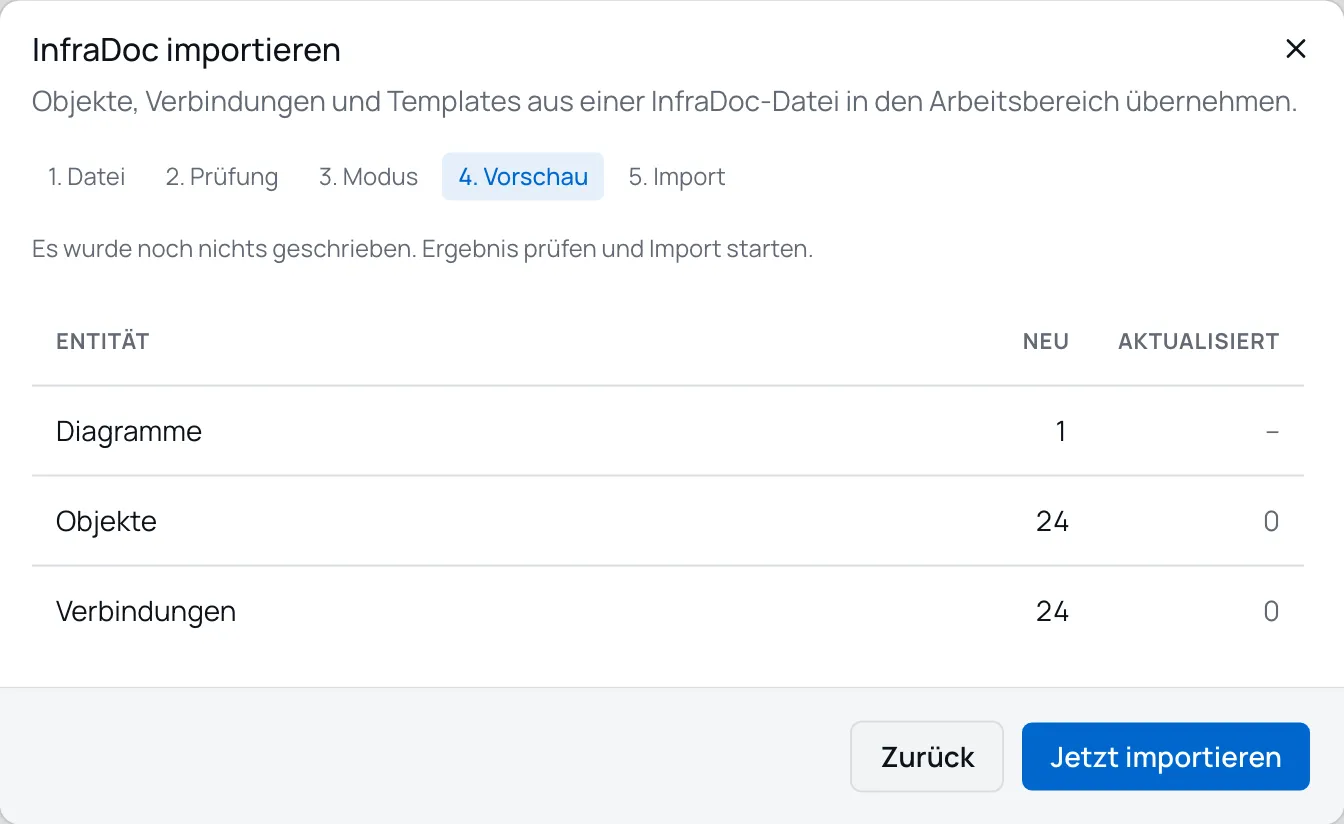
No import writes anything before you release it. InfraMap validates the file, shows the result in numbers and waits for your click.
- Three ways:
- create a new diagram, reconcile existing objects or simply add to a canvas you already have.
- Counted before writing,
- so how many objects and connections would be new and how many would be updated.
- Strictly validated.
- The file is checked against the schema and rejected entirely on the first violation, rather than half imported. The import takes no more than 10 MB.
Send us your documents.
In the first call we turn them into your first diagram, so you can see what is actually inside your own files. Thirty minutes, free of charge.