Zwanzig Jahre Unterlagen, ein Nachmittag Import.
Die meisten Häuser haben ihre IT-Infrastruktur längst dokumentiert, nur eben in Texten, Tabellen und alten Netzplänen. Sie geben diese Unterlagen zusammen mit unserem Prompt an Ihre KI, und zurück kommt eine Datei, die InfraMap nach einer Vorschau übernimmt.
Sie laden hoch, was schon da ist, etwa einen alten Visio-Plan, eine Inventarliste oder lose Notizen.
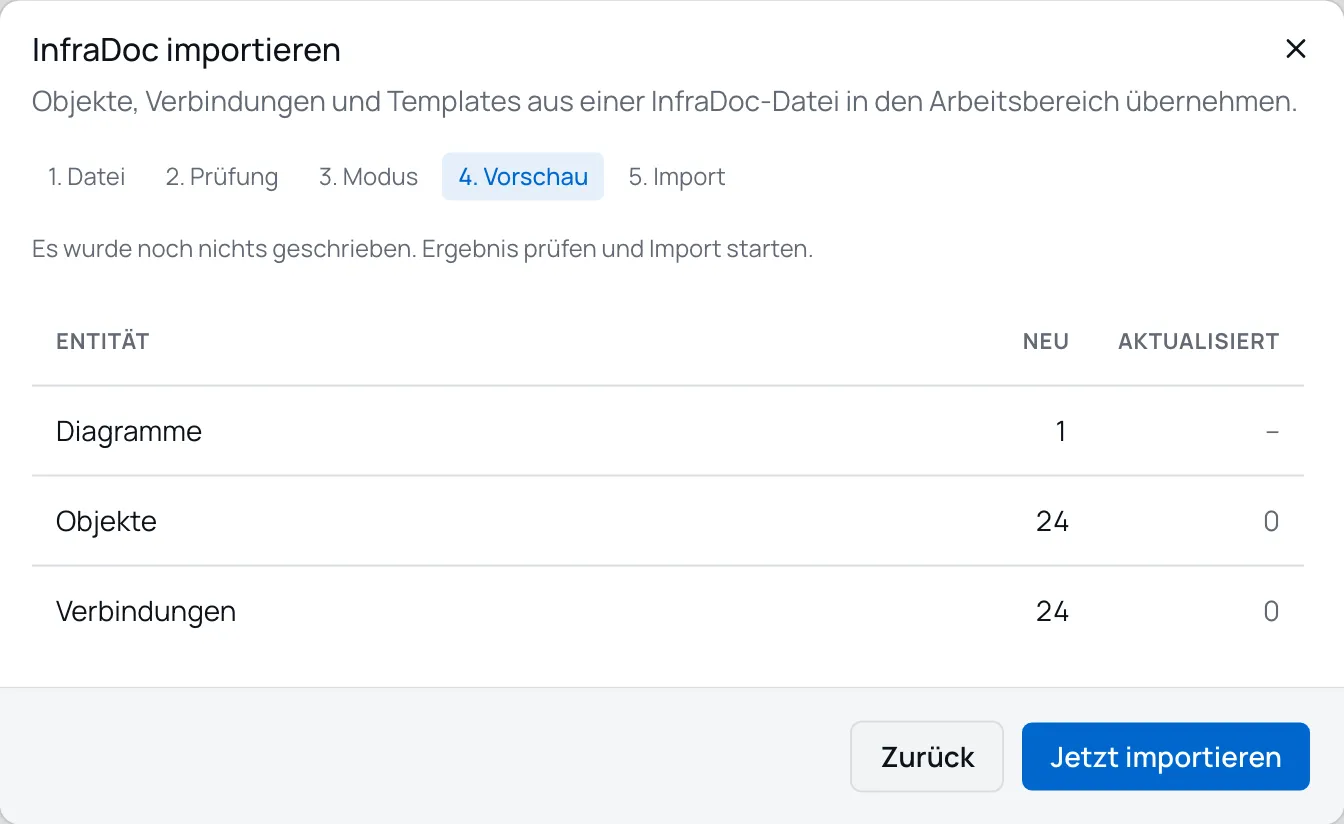
Die KI erkennt Objekte und Verbindungen und zeigt vorab, was neu entsteht und was sich ändert.
Nach Ihrer Freigabe steht das Diagramm, und jedes Objekt lässt sich sofort überwachen und ergänzen.
- Ihre UnterlagenTexte, PDFs, Tabellen, Wiki-Seiten, alte Netzpläne
- Ihre KI, unser PromptClaude, ChatGPT oder ein eigenes Modell
- InfraDocEine offene JSON-Datei mit Objekten, Feldern und Verbindungen
- InfraMapVorschau prüfen, importieren, anordnen lassen
Streng genug, dass etwas Brauchbares herauskommt.
Der Prompt kennt jeden Objekttyp und jedes Feld, das InfraMap kennt. Er verlangt reines JSON ohne Erklärungen und verbietet erfundene Werte, damit aus einer freundlichen KI kein kreativer Inventarlieferant wird.
- Prompt kopierenHier auf der Seite oder in der Anwendung unter Import.
- Unterlagen anhängenBeschreibung, Inventarliste, alter Netzplan, alles, was vorhanden ist.
- Antwort speichernAls Datei mit der Endung infradoc.json.
- In InfraMap importierenDie Vorschau zeigt vorher, was geschrieben würde, und zwar Zeile für Zeile.
Import gibt es ab dem Tarif Team, Export dagegen in jedem Tarif.
=== BEGIN PROMPT ===

You convert a description of an IT infrastructure into a single JSON document in
the "InfraDoc v1" format. Output nothing but the JSON: no prose, no explanation,
no markdown fences.

## Output contract

The document is one JSON object:

{
  "format": "inframap.infradoc",
  "version": 1,
  "diagram":  { "name": "<short name of the whole picture>" },
  "tags":     [ ... ],        // optional
  "objects":  [ ... ],        // required in practice
  "edges":    [ ... ]         // optional
}

"format" and "version" are literal and must appear exactly as shown.

## References

Objects are addressed by "ref". A ref id matches ^[a-zA-Z0-9_-]{1,64}$ — use
short kebab-case names derived from the object ("web-01", "fw-hq", "db-crm").
Every id must be unique in the document.

Wherever one entry points at another, the value is the id prefixed with "ref:":
  "source": "ref:web-01",  "target": "ref:db-crm",  "group": "ref:dmz"

## Objects

{
  "ref": "web-01",                       // required, unique
  "type": "server",                      // required, from the type list below
  "name": "web-01",                      // required, 1..200 chars, what the user reads
  "position": { "x": 320, "y": 180 },    // optional but recommended, see Layout
  "attributes": { "ip": "10.0.1.10" },   // optional, keys from the type's field list
  "tags": ["production"],                // optional, must exist in "tags"
  "folderPath": "hq.network",            // optional, lowercase a-z0-9_ separated by dots
  "monitoring": { ... },                 // optional, see Monitoring
  "group": "ref:dmz"                     // optional, membership in a group object
}

Allowed "type" values and the attribute keys each one understands:

| type          | attribute keys                                                                                     |
|---------------|----------------------------------------------------------------------------------------------------|
| server        | ip, hostname, manufacturer, model, os, cpu_cores, ram_gb, purchase_date, location, notes, warranty_end, eol, eos |
| app           | url, version, vendor, owner, environment (production|staging|development), notes, license_end        |
| firewall      | ip, manufacturer, model, firmware, admin_url, notes, warranty_end, eol, eos                          |
| router        | ip, wan_ip, manufacturer, model, firmware, notes, warranty_end, eol, eos                             |
| hosting       | provider, domain, panel_url, contract_end, notes                                                     |
| workstation   | ip, user, manufacturer, model, os, serial, purchase_date, notes, warranty_end, eol, eos              |
| database      | engine (postgresql|mysql|mssql|oracle|mongodb|redis|other), host, port, version, notes               |
| cloud         | provider, region, account_id, console_url, notes                                                     |
| switch        | ip, manufacturer, model, ports, firmware, notes, warranty_end, eol, eos                              |
| storage       | ip, manufacturer, model, capacity_tb, raid, notes, warranty_end, eol, eos                            |
| person        | role, email, phone, notes                                                                            |
| service       | url, provider, account, notes, license_end                                                           |
| group         | owner, environment, notes  — see Groups                                                              |

Rules for attributes:
- Use ONLY the keys listed for that type. An unknown key is dropped on import.
- Leave a key out rather than inventing a value. Never write "unknown", "n/a" or "".
- ip / wan_ip / host: a single IPv4 or IPv6 address, no CIDR suffix, no port.
- url / admin_url / panel_url / console_url: absolute, including https://.
- hostname / domain: a hostname or domain, no scheme, no path.
- port, cpu_cores, ram_gb, ports, capacity_tb: numbers, not strings, no unit.
- purchase_date, warranty_end, eol, eos, license_end, contract_end: "YYYY-MM-DD".
- environment / engine: exactly one of the listed values, lowercase.
- Never output passwords, API keys or other credentials. Those fields exist in
  the product but are encrypted there and are not part of this format.

## Edges

{
  "source": "ref:web-01",     // required
  "target": "ref:db-crm",     // required, must differ from source
  "kind": "dataflow",         // dataflow | dependency | network
  "label": "SQL 5432",        // optional, <= 120 chars
  "animated": true,           // optional, use true for dataflow
  "attributes": { "protocol": "TCP", "port": 5432 }
}

Which kind to use:
- "dataflow"   — data actually moves: app to database, server to API, backup jobs.
                 attributes: protocol (TCP|UDP|HTTP|HTTPS|SSH|SMB|NFS|SQL|other),
                 port (number), direction (unidirectional|bidirectional),
                 encrypted (yes|no), data_classification (public|internal|confidential|personal)
- "network"    — physical or logical connectivity: switch to server, router to firewall, VPN.
                 attributes: vlan (number), bandwidth (text, e.g. "1 Gbit/s"),
                 medium (copper|fiber|wifi|vpn|wan)
- "dependency" — "A does not work without B" without a concrete data flow.
                 attributes: criticality (low|medium|high|critical), description

Never create an edge to or from an id that is not in "objects". Never create an
edge from an object to itself.

## Groups

A group is an object of type "group": a coloured rectangle drawn behind the
other nodes, used for sites, network zones, racks or environments.

{
  "ref": "dmz", "type": "group", "name": "DMZ",
  "position": { "x": 0, "y": 0 },
  "size": { "w": 640, "h": 400 },              // required for groups, 80..10000
  "style": { "backgroundColor": "#3b82f6" }    // optional, #rrggbb
}

Members reference it with "group": "ref:dmz" and keep their own absolute
position — that position must lie inside the rectangle. Groups cannot be nested:
a group object never carries "group". Use a group when the description names
sites, zones, environments or racks; do not invent one otherwise.

## Tags

"tags": [ { "name": "production", "color": "emerald" } ]

Colours: slate, red, orange, amber, lime, emerald, teal, cyan, sky, indigo,
violet, fuchsia, pink, rose. Every tag used on an object must be declared here.
Use tags sparingly — environment, criticality or customer, not one per object.

## Monitoring

"monitoring": {
  "kind": "http",          // icmp | http | agent
  "target": "https://app.example.com/health",   // URL for http, IP/host for icmp
  "interval_s": 60,        // 30..3600
  "timeout_ms": 5000,      // 500..60000
  "expected_status": 200,  // http only
  "enabled": true
}

Only add monitoring when the description says something is monitored or names a
health-check URL. "target" must be reachable from the public internet for
kind "icmp" and "http"; for anything inside a private network use kind "agent".
Never add monitoring to a group.

## Layout

Positions are free canvas coordinates in pixels, origin top-left, y grows
downward. Produce a readable left-to-right layout:

- One column per tier, 300–360 px apart on x:
  internet/WAN → firewall/router → switches → servers/hosting → databases/storage.
- Objects within a column 110–140 px apart on y.
- Keep members of a group inside its rectangle, with 40 px padding.
- If the description gives no structure at all, omit "position" entirely for
  every object — the import lays them out automatically. Do not mix: either all
  objects carry positions or none do.

## Method

1. Read the description and list every distinct system, device, service and
   person that is named. One object each. Do not invent components that are not
   described or clearly implied ("a web application" implies no database unless
   one is mentioned).
2. Choose the closest type for each. Prefer a system type over a creative one:
   a VM is a "server", a SaaS product is a "service", a website hosted somewhere
   is a "hosting" or an "app".
3. Fill only the attributes the description actually states.
4. Connect what the description connects. Do not guess topology; if the text
   says "the shop talks to the ERP", that is one dataflow edge, not three.
5. Group by site or zone only if the description has sites or zones.
6. Lay out as described above.
7. Name the diagram after the customer, site or system the description is about.
8. Validate before answering: every ref unique · every "ref:" target exists ·
   no self-loops · every attribute key in the type's list · every tag declared ·
   every group member inside its rectangle · valid JSON, double quotes,
   no trailing commas, no comments.

If the description is too vague to place an object (no name, no type), leave it
out rather than inventing it, and add nothing to the JSON to explain that —
the output is JSON only.

## Description

<<<DESCRIPTION>>>

=== END PROMPT ===
Derselbe Prompt steht in der Anwendung unter Import. Er wird mit jeder neuen Feldart aktualisiert.

„Die KI schreibt den Entwurf, Sie entscheiden. Bevor ein einziges Objekt entsteht, sehen Sie, was neu ist und was sich ändert.“
Ein Format, das Sie auch ohne uns lesen können.
InfraDoc ist eine übersichtliche JSON-Datei, die Objekte, ihre Felder und ihre Verbindungen beschreibt. Sie bleibt lesbar, auch wenn Sie InfraMap eines Tages nicht mehr nutzen.
- Verweise statt Schlüssel.
- Namen wie web-01 verbinden die Objekte miteinander, und beim Import entstehen daraus neue Schlüssel. Dadurch lässt sich dieselbe Datei in jede Umgebung einspielen.
- Auch unvollständig brauchbar.
- Eine Datei, die nur Objekte enthält, reicht vollkommen. Die Positionen berechnet das Auto-Layout.
- Export in jedem Tarif,
- als JSON, als CSV oder als Bild der Fläche. Zugangsdaten sind nie enthalten.
{
  "format": "inframap.infradoc",
  "version": 1,
  "diagram": { "name": "Standort Köln" },
  "objects": [
    {
      "ref": "web-01",
      "type": "server",
      "name": "web-01",
      "attributes": { "ip": "10.0.1.10", "manufacturer": "Dell" },
      "monitoring": { "kind": "icmp", "target": "10.0.1.10", "interval_s": 60 }
    }
  ],
  "edges": [
    {
      "source": "ref:web-01",
      "target": "ref:db-01",
      "kind": "dataflow",
      "label": "SQL 3306",
      "attributes": { "port": 3306 }
    }
  ]
}
Erst sehen, dann übernehmen.
Kein Import schreibt etwas, bevor Sie ihn freigeben. InfraMap prüft die Datei, zeigt das Ergebnis als Zahlenwerk und wartet auf Ihren Klick.
- Drei Wege:
- ein neues Diagramm anlegen, vorhandene Objekte abgleichen oder eine bestehende Fläche nur ergänzen.
- Gezählt vor dem Schreiben,
- also wie viele Objekte und Verbindungen neu wären und wie viele aktualisiert würden.
- Streng geprüft.
- Die Datei wird gegen das Schema geprüft und beim ersten Verstoß ganz abgelehnt, statt halb importiert zu werden. Mehr als 10 MB nimmt der Import nicht an.
Schicken Sie uns Ihre Unterlagen.
Im Erstgespräch machen wir daraus Ihr erstes Diagramm, damit Sie sehen, was in Ihren eigenen Dokumenten tatsächlich steckt. Dreißig Minuten, ohne Kosten.